Carriers and fleet owners can now identify their Electric Vehicles (EV) on the Exchange, and a green leaf icon makes them easy to spot. As a load poster, you can use this to find EV- equipped carriers when reviewing quotes, searching the Directory, or using the Live Availability Map.
Find Electric Vehicles via quotes
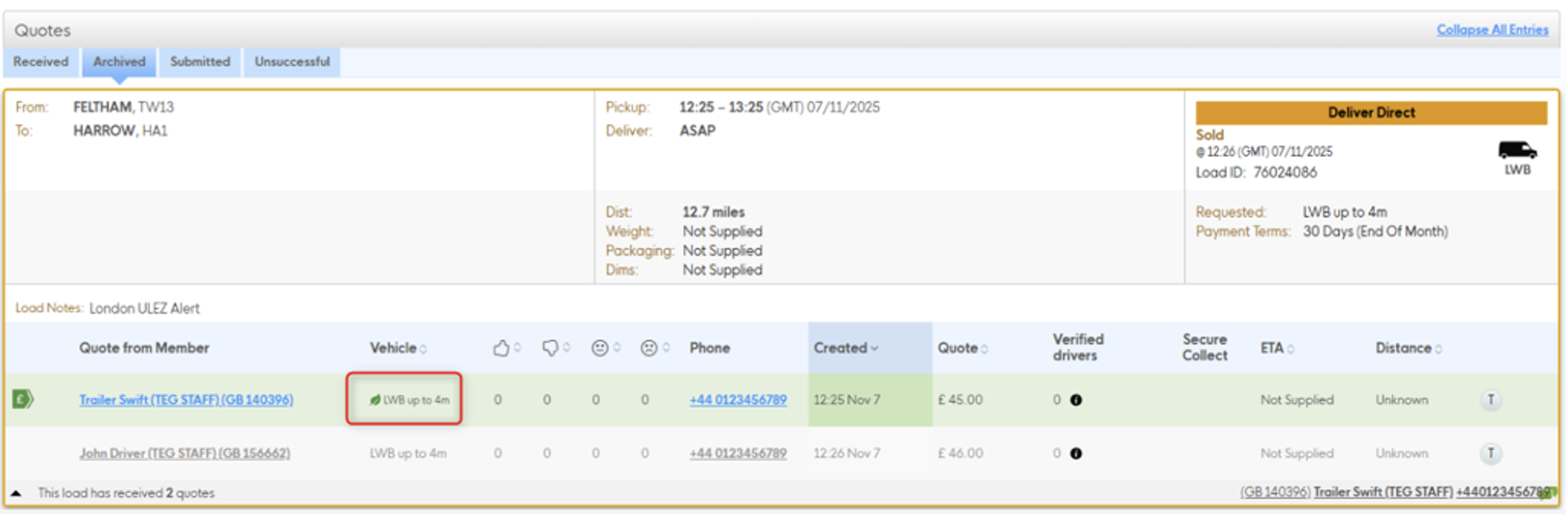
No action needed. When a carrier submits a quote using a vehicle they’ve marked as electric, the leaf icon will appear automatically to the left of the vehicle size in your Quotes page. Look out for it in the vehicle column when reviewing received quotes.
The leaf icon is also visible on the Archived tab for sold and cancelled loads.
Find Electric Vehicles via the Member Directory
• Open the Member Directory from the main navigation.
• In the search sidebar on the left, scroll down to the Vehicle Extras section.
• Check the Electric Vehicle checkbox.
• Click Search.
Your results will show only members with at least one electric vehicle on their account.
• For individual drivers, “Electric Vehicle” is shown in the Body Type section of their
member details.
• For companies, “Electric Vehicle” is shown in the Fleet Details popup for each vehicle
that has been marked as electric.
Find Electric Vehicles aia the Beta Live Availability Map
EV carriers are identified on the Beta LAM by the leaf icon, which replaces the standard
vehicle icon on their carrier card and map pin.
• Collapsed carrier card — the leaf icon appears to the left of the vehicle size
descriptor in the left-hand carrier list.
• Expanded carrier card — the leaf icon appears when you open a collapsed card.
• Hover preview — the leaf icon appears when you hover over a vehicle pin on the
map.
There is currently no separate EV filter on the Live Availability Map. To search specifically for
EV carriers, use the Electric Vehicle filter in the Directory first, then contact them directly or
book from the map.
Please note: the leaf icon on the map updates on the next manual page refresh rather than
in real time. If a carrier has recently updated their vehicle status and the icon isn’t showing,
try refreshing the page.
in real time. If a carrier has recently updated their vehicle status and the icon isn’t showing,
try refreshing the page.
Find Electric Vehicles via the API
If you access the Exchange via the public API, EV status is returned as part of the Quote
object. When a carrier submits a quote using a vehicle marked as electric, the API response
will include electric_vehicle: true. You can use this to build your own EV-filtering logic within your integration.
Requesting an electric vehicle for a load
There is currently no dedicated field on the load posting form to specify that you require an electric vehicle. If you need an EV for a load, you can communicate this in the load notes field when posting.
For example:
“Please note: we require an electric vehicle for this load. Only quote if your assigned vehicle is electric.”
“Please note: we require an electric vehicle for this load. Only quote if your assigned vehicle is electric.”
Carriers can then decide whether to quote, and you can use the leaf icon on received quotes
to identify EV carriers when allocating.
A few things to know
• EV status is self-declared by carriers. The Exchange does not currently verify vehicle
type.
• The leaf icon indicates that a carrier has at least one electric vehicle available. It
does not mean their entire fleet is electric. You can view their full fleet details in the
Directory to see which specific vehicles are marked as electric.
• Load allocation remains entirely at your discretion. The leaf icon is a visibility tool — it
gives you the information you need to make an informed choice, but does not affect
how quotes are ranked.